Blocking Outgoing Malicious IP Addresses Using pfSense
I have spent the past seven years doing pre-sales for security products. I have always tried to put myself in the practitioners shoes to understand the issues they may encounter using the products I have pitched. It is very important that I believe in what I offer. I also self host, therefore I go through a similar practice with the open source projects I use. Where I go beyond with the open source options and self hosting is I am the practitioner. Why I say all of this, one of the areas I have wanted to delve deeper in is open source intelligence.
This is where this post comes in. In my self hosting, I have noticed a number of activities coming from an array of IPs. It's almost not manageable. I have a few posts related to this topic using fail2ban showing the power of one rule and results of that one rule, and some additional rules. In the second post, I get into blocking entire IP ranges to help mitigate attacks, unfortunately it might be at the expense of 'good' users. Having said all that, this is for blocking of incoming IP addresses.
I came across two repositories owned and managed by Romain Marcoux, one for malicious outgoing ips and one for malicious incoming ips. I immediately thought this would be a good use of open source intel to help protect my personal infrastructure. I will create a follow up post for incoming.
TLDR; Steps
These are the steps I have taken. There are a number of ways to achieve this, however, this is how I went about it.
- Initial Concerns
- [Optional] Mirror the Repository Locally
- Upload the Lists to pfSense
- [May Be Optional] Set Firewall Max Table Entries to Larger Value
- Create Alias Referencing the List(s)
- Create Firewall Rule
- Final Thoughts
The steps are pretty straightforward and it might not be as complicated as you expect.
Initial Concerns
My initial concerns were all around the performance of my pfSense box. I have never taken part in any sizing exercises for it, so I simply just gave it a wing and hoped for the best. My goal was to find the most performant option requiring minimal effort to implement (IE. I wanted something simple and effective).
My secondary concern was "how annoying is going to be to implement". Not a big concern, but, was still top of mind.
Lastly, what type of activity am I going to find.
[Optional] Mirror the Repository Locally
Just a suggestion - especially if you self host an SCM - that you mirror that repository. This will ensure you are always up to date on the IP address list as well as offers a level of redundancy when it comes to GitHub's service availability.
If you use Gitea, that can simply be done via the "Migration" options when creating a new repository.
Upload the Lists to pfSense
For a basic deployment, you can simply copy the file locally and sftp it to the firewall.
Important
- Ensure you have ssh/sftp access to the firewall from your current connection
- Do not forgot to close off access once you are complete.
Upload the two "full-outgoing" files to get all of the IP addresses. The command should be as simple as:
# Login
sftp <user>@<firewall-ip>

# This will put all the outgoing ip files into the www directory
put full-outgoing-ip-a* /usr/local/www
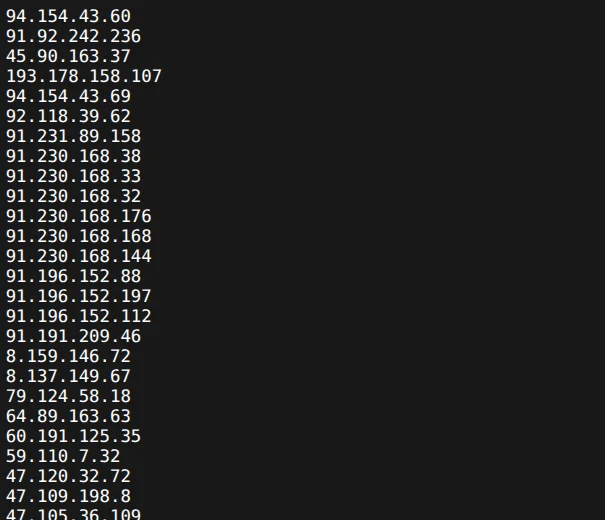
If you have web access to the firewall, you can now test to see if the list is being served by going to the address:
# This should work if you kept the default names and configuration (it will test the first file of two)
https://<firewall-ip>/full-outgoing-ip-aa.txt
It should be a wall of IP addresses similar to the image below:
[May Be Optional] Set Firewall Max Table Entries to Larger Value
This is to make note of depending on how large your project becomes.
Under the System > Advanced > Firewall & NAT within the sub-heading Packet Processing you will see Firewall Maximum Table Entries. I don't recall with that default was as I have modified mine. The current list is over 127,000 IPs, so ensure this number is above that. My configuration is currently set to 1,000,000.
Create Alias Referencing the List(s)
Go to Firewall > Aliases > URLs and create an Alias.
Click Add and fill out the details. Give it a name and reference the local address of the lists. When you are done it should look very similar to this:

Create Firewall Rule
This may be the easiest part if you have created a firewall rule before.
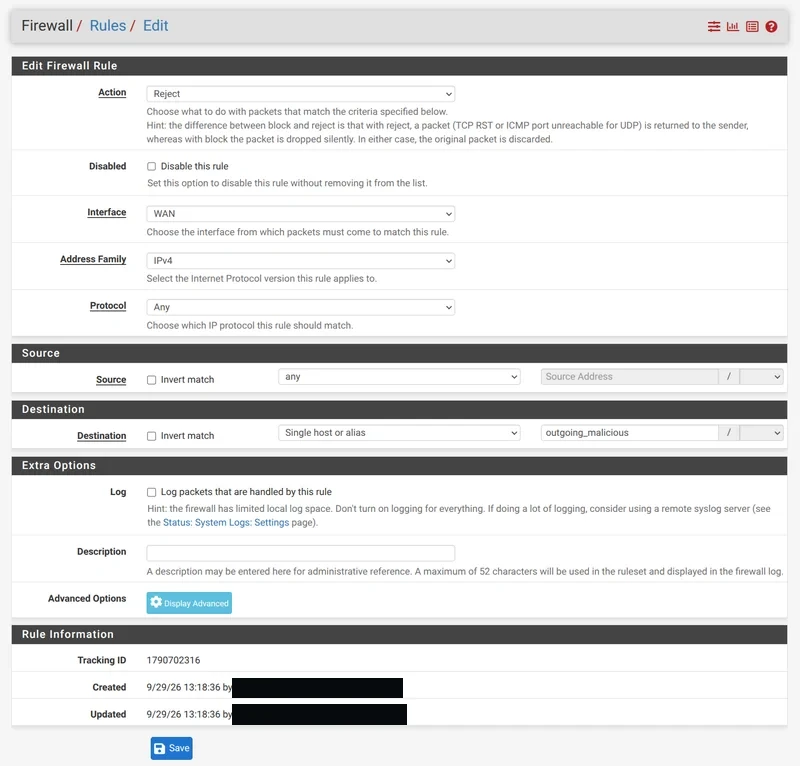
Go to Firewall > Rules and hit the ⬆️ Add button (this creates a rule at the top).
Here are how the settings are configured:
- Action: Reject (since it is internal, I wanted it Reject vs Block)
- Interface: WAN (In screenshot, I did it for all of interfaces)
- Address Family: IPv4
- Protocol: Any
- Source: Any
- Destination: select the drop down "Single Host or alias", then select the list; in this case "outgoing_malicious"
- [Optional] Log: Enable if you want to track and have the space.
You will end up with this:
Ensure they are the top most, or one of the top rules so other rules will not bypass it.
Final Thoughts
There you have it, now you have a layer of security from reputable, malicious sites for activities such as command and control centres as well as phishing attacks. It adds an additional layer of security when it comes to malicious sites you could potentially visit by polluted domains. As I was alluded to earlier, this isn't the end-all-be-all of solutions, but, a great bonus on top of standard practices at home.
One piece I plan on implementing in the future is the automation of updating these lists. For that, I will deploy the IP address lists on an internal server, reference that address and update the lists on the fly to create a constantly updated list.
I think I can call this my first OSINT project. Hope it is helpful.